Skip to content
ODOO EXTENSION

Stock Transfer Approval

With PIN and signature, for Odoo 18

No transfer between warehouses is validated without a request signed by warehouse staff and the approval of a manager with a personal PIN and signature. A PDF certificate carrying both signatures, automatic notifications and server-side enforcement, on Odoo's standard inventory.

US$ 879.00 One-time licence · Implementation quoted separately

* Annual maintenance US$ 300. First payment falls due one year after purchase.

Automation Inventory Warehouse
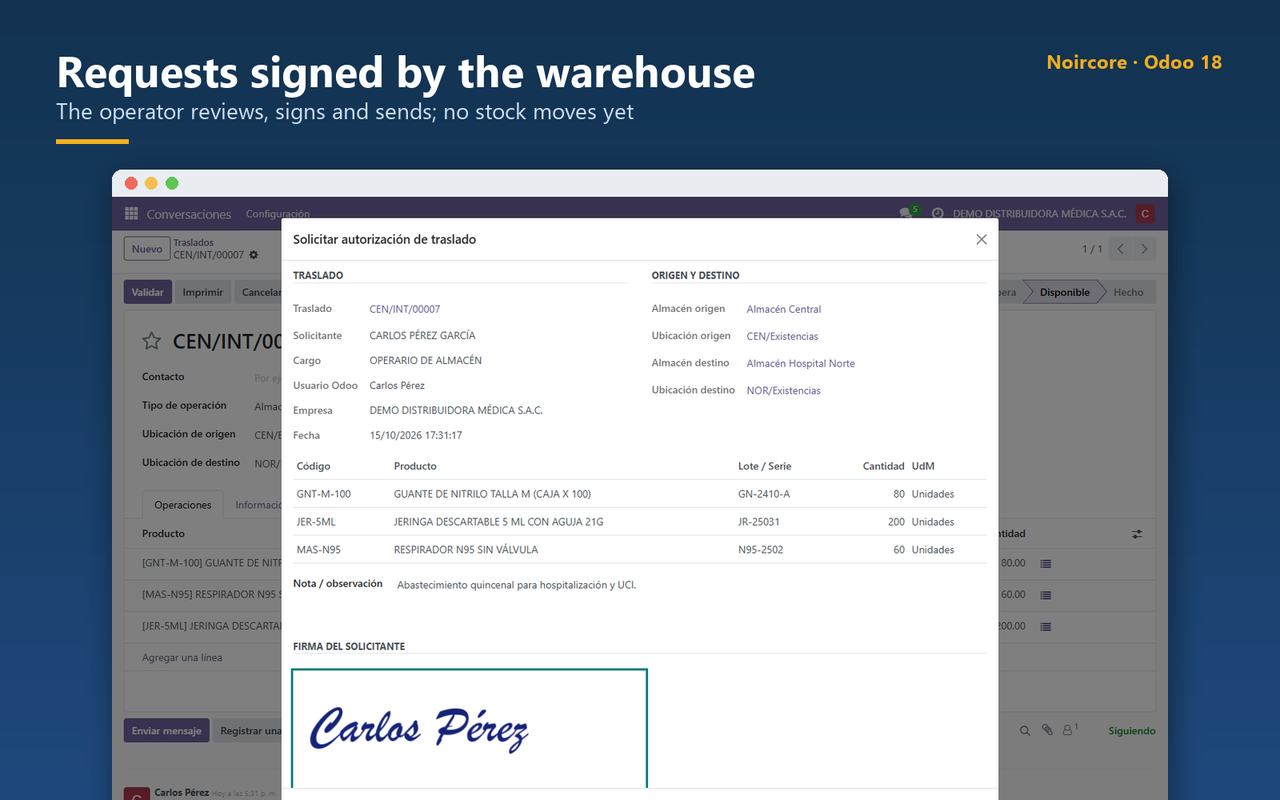
Requests signed by the warehouse: The operator reviews, signs and sends; no stock moves yet

Deployment

The licence covers the extension. Deployment can be handled by Noircore or by your own IT department, and the choice does not change the licence price.

Option A

Assisted deployment by Noircore

Our team reviews the current platform, installs on a test environment, configures the rules alongside the process owner and accompanies the move to production.

Scoped and quoted separately, based on your environment.

Option B

Deployment by your IT department

The licence is delivered with the installation package, the technical prerequisites, the step-by-step installation and configuration procedure and the rollback instructions, so your own team can carry out the deployment.

Included with the licence, at no additional cost.

Screens

Stock Transfer Approval with PIN & Signature for Odoo 18

No transfer between warehouses is validated without a request signed by warehouse staff and the approval of a manager with a personal PIN and signature. A PDF certificate carrying both signatures, automatic notifications and server-side enforcement, on Odoo's standard inventory.

Who it is for

  • Medical and pharmaceutical distributors running several warehouses.
  • Hospitals, clinics and pharmacies moving stock between sites or departments.
  • Logistics providers and companies with quarantine, approved-stock or returns warehouses.
  • Any company that must prove who requested and who authorised each transfer.

What it solves

  • Requests signed by the warehouse. The operator clicks Validate, reviews the transfer, signs and sends the request. Nothing moves yet, and it is clear who asked for it.
  • Approval with a personal PIN and signature. The manager opens the request, enters their own PIN, signs and approves: the transfer is validated in that same step. They can also reject it with a reason.
  • PDF certificate with two signatures. Each approved transfer produces a certificate with the company logo, products, lots and quantities actually moved, and the signatures of the requester and the approver with name and job title.
  • Automatic notifications. Approvers get an activity, an internal notification and an email; the requester gets the outcome with the certificate attached.
  • Real server-side enforcement. No button, import, automated action or external call can move stock without a valid approval. If the transfer changes after approval, the approval is voided.
  • Configurable and reversible. Per company: only between different warehouses, or every internal transfer. Switch it on and off without uninstalling and without losing history.

Features

Requests from warehouse staff

  • Clicking Validate opens "Request transfer approval": transfer, requester, job title, company, warehouses and locations, date, products, lots and quantities.
  • Requester signature is mandatory and a note is optional. The requester is always the logged-in user: nobody can request on behalf of someone else.
  • The transfer becomes "Pending approval" and no stock moves. Clicking Validate again never duplicates the request.
  • Only people configured as requesters can request approval.

Approver's inbox

  • Inventory › Operations › Transfer approvals: approvers land on the pending requests, each with a "Review" button.
  • Filters by status, my requests and requested today, grouped by source or destination warehouse.
  • Each request shows the requester's signature and note, source, destination and products.

Approval with PIN and signature

  • The approver is always the logged-in user and the PIN requested is their own; nobody can use another person's PIN.
  • 6-digit PIN hashed with PBKDF2-SHA512 (600,000 rounds), lockout after failed attempts and single-use verification bound to the dialog.
  • "Approve and validate transfer" records the approval, moves the stock exactly once, generates the PDF and notifies the requester.
  • Segregation of duties: nobody approves their own request, except for an audited administrator exception.

PDF certificate and audit trail

  • Certificate using the company's document layout, quantities actually moved, lots or serial numbers and two signature blocks.
  • Names and job titles are stored when signing: old certificates never change if the configuration is edited later.
  • PDF protected against edits and deletion. If the company's layout is not compatible, Odoo's standard layout is used and the reason is recorded.
  • Chatter with the request, verified identity, approval, rejection or voiding, never showing the PIN.

Automatic notifications

  • "Approve transfer" activity for every active approver; one approval or rejection closes them all.
  • Internal notification in the Odoo inbox and emails from editable templates: pending request, transfer approved (with the certificate) and transfer rejected (with the reason).
  • An email failure never blocks the flow; failed messages can be retried.

Server-side security

  • Enforcement sits at Odoo's single point where stock moves are executed: it also covers stock relocations, automated actions and RPC calls.
  • If source, destination, products, lots or quantities change after the request or the approval, the request is voided and must be sent again.
  • Protection against double clicks and simultaneous approvals: stock moves exactly once.

Per-company configuration

  • Turn the feature on or off without uninstalling: when off, Odoo behaves exactly like standard.
  • Scope: only between different warehouses (default) or every internal transfer. Receipts, deliveries and adjustments never require it.
  • Requesters and approvers linked to real users, with document name, job title and email; PIN policy, notifications and certificate texts.

Proven quality

  • 88 automated module tests
  • 613 standard Odoo Inventory tests run alongside the module, with no regressions
  • 600,000 PBKDF2-SHA512 rounds per PIN
  • 1 step to approve and validate: PIN, signature and stock move

Tested on a local server with Odoo 18.0 Community and fictitious data.

Technical specifications

Module version18.0.5.0.0
Odoo version18.0 (tested on Odoo 18.0 Community)
Dependenciesstock, mail
Works withLots and serial numbers, backorders, multi-company, the company's document layout
LibrariesThose shipped with Odoo 18 (passlib, Pillow). PDFs with wkhtmltopdf 0.12.6
LanguageUser interface, emails and certificate in Spanish
SignatureSimple electronic signature, drawn or uploaded on screen (not a certified digital signature)
PINPersonal, 6 digits, irreversible PBKDF2-SHA512 hash, lockout after failed attempts
LicenseOPL-1 (Odoo Proprietary License v1.0): use under a purchased license; the module may not be redistributed or resold
IncludedInstallable module and installation, configuration and user guide (README, in Spanish)
SKUTRF-18

Frequently asked questions

Does it change how Odoo's standard inventory works?

Only for transfers in scope: clicking Validate asks for the signed request. Receipts, deliveries, adjustments and transfers out of scope work as usual. When switched off, Odoo behaves exactly like standard.

Which transfers require approval?

You choose per company: only transfers between different warehouses (default), or every internal transfer, even between racks of the same warehouse.

Who can request and who can approve?

The people the administrator configures as requesters and approvers, always linked to a real Odoo user. A user can hold one role, both or neither, and nobody approves their own request.

Where is the PIN stored?

As an irreversible PBKDF2-SHA512 hash, in a model no user can access. It never appears on screens, in emails, chatter, logs or PDFs.

Can the approval be bypassed from another button or an import?

No. The check sits where Odoo executes stock moves, so it also covers relocations, automated actions and external calls.

Is the signature a certified digital signature?

No. It is a simple electronic signature, drawn or uploaded on screen, printed on the certificate with each signer's name, job title and date.

What happens if email fails?

Nothing is blocked: the request, the approval and the transfer go ahead, and failed emails can be retried.

Which Odoo version do I need, and what language is it in?

Odoo 18.0 with the stock and mail modules; tested on Odoo 18.0 Community. The user interface, emails and certificate are in Spanish.

Can I install it in several companies or resell it?

It works in multi-company setups, with its own settings per company. It is licensed under the Odoo Proprietary License v1.0 (OPL-1): it may not be redistributed, sublicensed or resold. For several databases, contact us.

Real screenshots of the module with fictitious demo data. Screens are in Spanish.

Noircore Partners is a commercial section of Noircore. The extensions listed here are developed by Noircore and are not official products of, certified by, or affiliated with Odoo SA or SAP SE.

Need this adapted to your deployment?

The Noircore Partners team reviews your current platform, the processes involved and the scope before anything is deployed.

Contact Partners