Skip to content
ODOO EXTENSION

Warehouse Portal

Third-party custody & 3PL portal for Odoo 18

Give your customers their own portal to see and manage the goods you store for them: inventory by lot, signed inbound and withdrawal requests, dock appointments and a verifiable digital record, all on Odoo's real inventory.

US$ 2,799.00 One-time licence · Implementation quoted separately

* Annual maintenance US$ 300. First payment falls due one year after purchase.

Customers Integration Inventory Warehouse
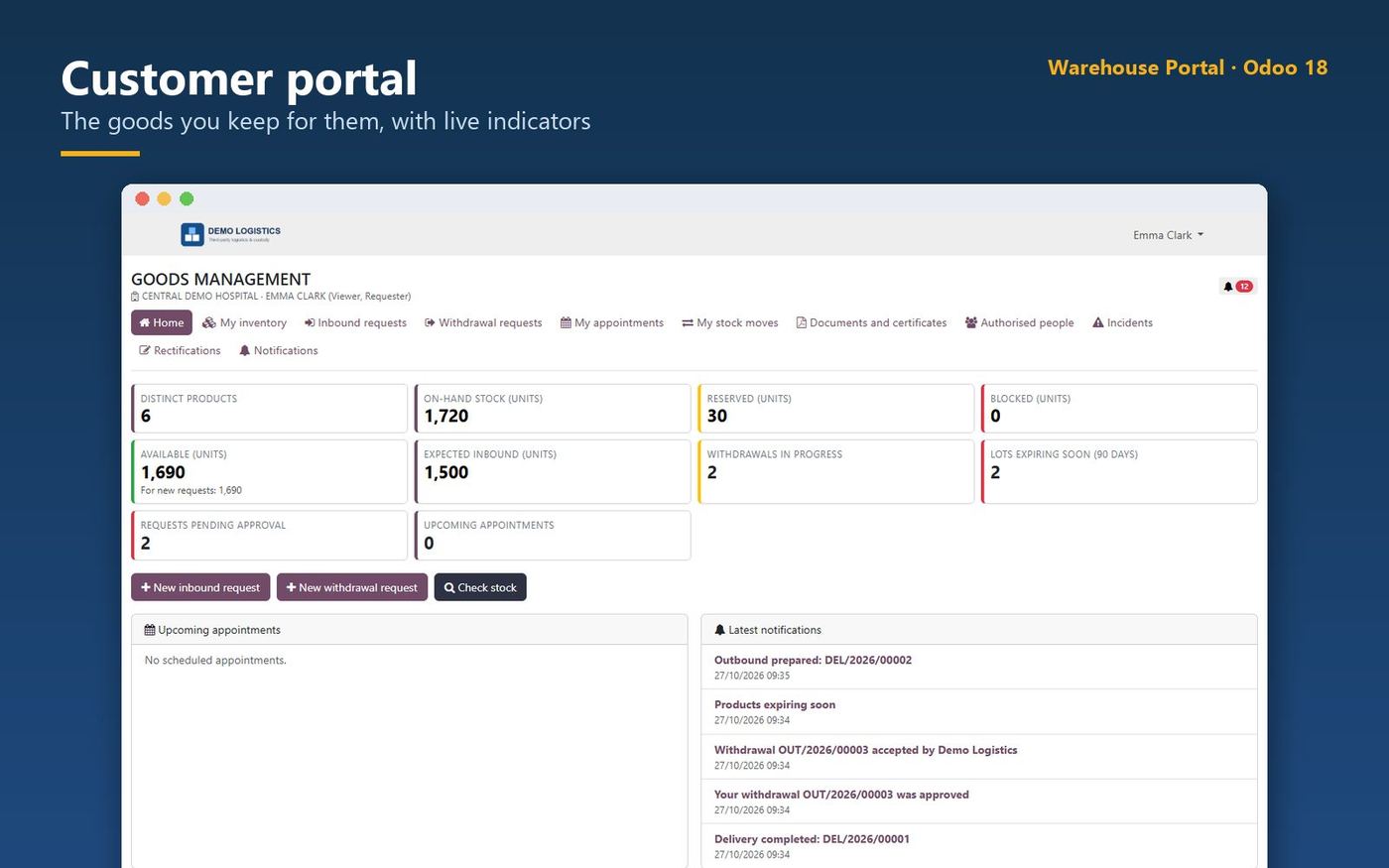
Customer portal: The goods you keep for them, with live indicators

Deployment

The licence covers the extension. Deployment can be handled by Noircore or by your own IT department, and the choice does not change the licence price.

Option A

Assisted deployment by Noircore

Our team reviews the current platform, installs on a test environment, configures the rules alongside the process owner and accompanies the move to production.

Scoped and quoted separately, based on your environment.

Option B

Deployment by your IT department

The licence is delivered with the installation package, the technical prerequisites, the step-by-step installation and configuration procedure and the rollback instructions, so your own team can carry out the deployment.

Included with the licence, at no additional cost.

Screens

Warehouse Portal

Give your customers their own portal to see and manage the goods you store for them: inventory by lot, signed inbound and withdrawal requests, dock appointments and a verifiable digital record, all on Odoo's real inventory.

Who it is for

  • Third-party logistics providers (3PL) storing goods owned by their customers.
  • Custody warehouses for medical and pharmaceutical supplies of hospitals and clinics.
  • Distributors holding their customers' consignment stock.
  • Any company that must give each customer access to its own stock, and only its own.

What it solves

  • Each customer sees only its own goods. Inventory by product and lot, expiry dates, stock moves and Excel export. Isolation by customer, owner, location and authorised person.
  • Nothing leaves without two signatures. The requester signs, the customer's approver approves and your warehouse accepts. Only then does Odoo reserve real stock.
  • The person picking up is verified. The authorised person gets a QR pickup credential. At the dock it is scanned and ID and plate are checked; the driver signs on a locked screen.
  • Clear receiving. Dock appointment, identified arrival, physical receipt with discrepancies and, separately, the customer's signed acknowledgement.
  • A record that cannot be altered. Each signed step issues a new PDF version with a SHA-256 fingerprint and a public verification QR code.
  • Built on standard Odoo. Uses native receipts, deliveries, lots, FEFO and backorders. No standard module is modified and third-party stock stays out of your valuation.

Features

Customer portal

  • Home dashboard: products, on-hand, reserved, blocked and available stock, incoming goods, withdrawals in progress, lots close to expiry and requests awaiting approval.
  • Inventory by product or lot: on hand, available and available to request (net of what is already committed), with search and Excel export.
  • Latest stock moves with their reference and direct links to the request and its documents.

Availability by lot and FEFO while ordering

  • Typing a code shows every lot with its available quantity, expiry date and status.
  • The screen states which lot goes out first under FEFO, and it is the one Odoo actually reserves.
  • Asking for more than a lot holds explains how to complete it with another lot.

Withdrawals with dual approval

  • Requester and customer's approver sign; the operator's acceptance reserves the stock.
  • Three transport modes: customer's own vehicle, designated carrier or operator dispatch.
  • Partial deliveries by truck on Odoo's native backorders.

Dock verification and driver signature

  • Pickup credential with a QR code: it identifies the authorisation but never authorises on its own.
  • Verification screen on the warehouse phone: camera or scanner, ID and plate, green or red result and a log of every attempt.
  • The driver signs on a locked screen that allows nothing else.

Inbound and receiving

  • Requests with origin (the customer, a supplier or another site) and Excel or CSV import.
  • Physical receipt with discrepancies, quarantine, inspection and cold-chain temperature.
  • Warehouse receipt and customer acknowledgement are two states with two separate signatures.

Dock scheduling

  • Docks with capacity, slot length and opening hours per day.
  • Arrival with the driver's ID, early arrival authorised with a reason, start and end of service.
  • Alerts for open appointments outside hours or pending closure.

Digital record and QR verification

  • Hand-drawn signature with mouse or finger, with technical evidence: SHA-256 fingerprint, server date and time and the signer's job title.
  • Cumulative PDF versions that are never overwritten; earlier versions stay in the history.
  • Public QR verification page with minimal data; ID numbers are masked.

Security and control

  • Customer and operator roles, delegations with validity periods and audited revocation.
  • Incidents with signed resolution and customer acknowledgement; holds, releases and returns.
  • Portal and email notifications, one per event and person.

Proven quality

  • 249 automated tests of the module
  • 3 formats checked in Chrome: desktop, tablet and phone
  • 0 standard Odoo modules modified
  • SHA-256 fingerprint on every signature and every PDF

Tests run with and without the Accounting module. Screenshots of the module with fictitious demo data; on-screen labels shown in English for illustration (the module ships in Spanish).

Technical specifications

ProductWarehouse Portal · version 18.0.1.13.0
Odoo version18.0 (tested on Odoo 18.0 Community)
Dependenciesstock, portal, mail, product_expiry
Works withAccounting (third-party goods are not valued), lots and expiry dates, FEFO, native backorders
Language and time zoneScreens and documents in Spanish (es_PE); English screenshots are illustrative. Business date in Lima time (America/Lima)
SignatureSimple electronic signature with technical evidence (not a certified digital signature)
Shipping guideRecords number and issuer per transport mode; does not issue electronic guides
Operator brandingName and logo of the company set up in Odoo, or a fixed name by parameter
LicenseOPL-1 (Odoo Proprietary License v1.0): use under a purchased license; the module may not be redistributed or resold
SKUNC-WHPORTAL-18

Frequently asked questions

Does it change standard Odoo inventory?

No. It works on real Odoo inventory with the customer as the owner of their goods. It does not modify standard modules, and third-party goods stay out of stock valuation.

Does each customer see only their own goods?

Yes. Access is limited by customer, owner, locations and authorised people, with viewer, requester, approver and delegated administrator roles.

Is the signature a certified digital signature?

No. It is a simple electronic signature drawn on screen, with technical evidence: SHA-256 fingerprint of the content, server date and time, IP, browser and job title. Every PDF says so.

Does it issue electronic shipping guides?

No. It records the guide number and who issues it for each transport mode, and can require it before dispatch.

Does it work on the phone?

Yes. The portal is tested on desktop, tablet and phone, including touch signatures.

Which Odoo version do I need?

Odoo 18.0 with the stock, portal, mail and product_expiry modules. Tested on Odoo 18.0 Community.

Can I install it for several companies or resell it?

The module is licensed under the Odoo Proprietary License v1.0 (OPL-1): it is used under a purchased license and may not be redistributed, sublicensed or resold. Contact us for multiple installations.

What language is it in?

Screens and documents are in Spanish (es_PE), with the business date in Lima time. The screenshots in this listing show on-screen labels in English for illustration only.

Screenshots with fictitious demo data. On-screen labels are shown in English for illustration; the module interface is in Spanish.

Noircore Partners is a commercial section of Noircore. The extensions listed here are developed by Noircore and are not official products of, certified by, or affiliated with Odoo SA or SAP SE.

Need this adapted to your deployment?

The Noircore Partners team reviews your current platform, the processes involved and the scope before anything is deployed.

Contact Partners