Skip to content
SAP BUSINESS ONE EXTENSION

Billing Guard

Billing control and e-invoicing supervision for SAP Business One (SAP HANA)

Billing control and e-invoicing supervision for SAP Business One (SAP HANA version). Billing Guard stops billing mistakes before they become documents, re-checks every invoice before e-invoice registration, shows the real electronic status of every document inside the ERP and emails an alert within minutes when something does not add up.

US$ 1,799.00 One-time licence · Implementation quoted separately

* Annual maintenance US$ 299. First payment falls due one year after purchase.

Automation Finance Sales
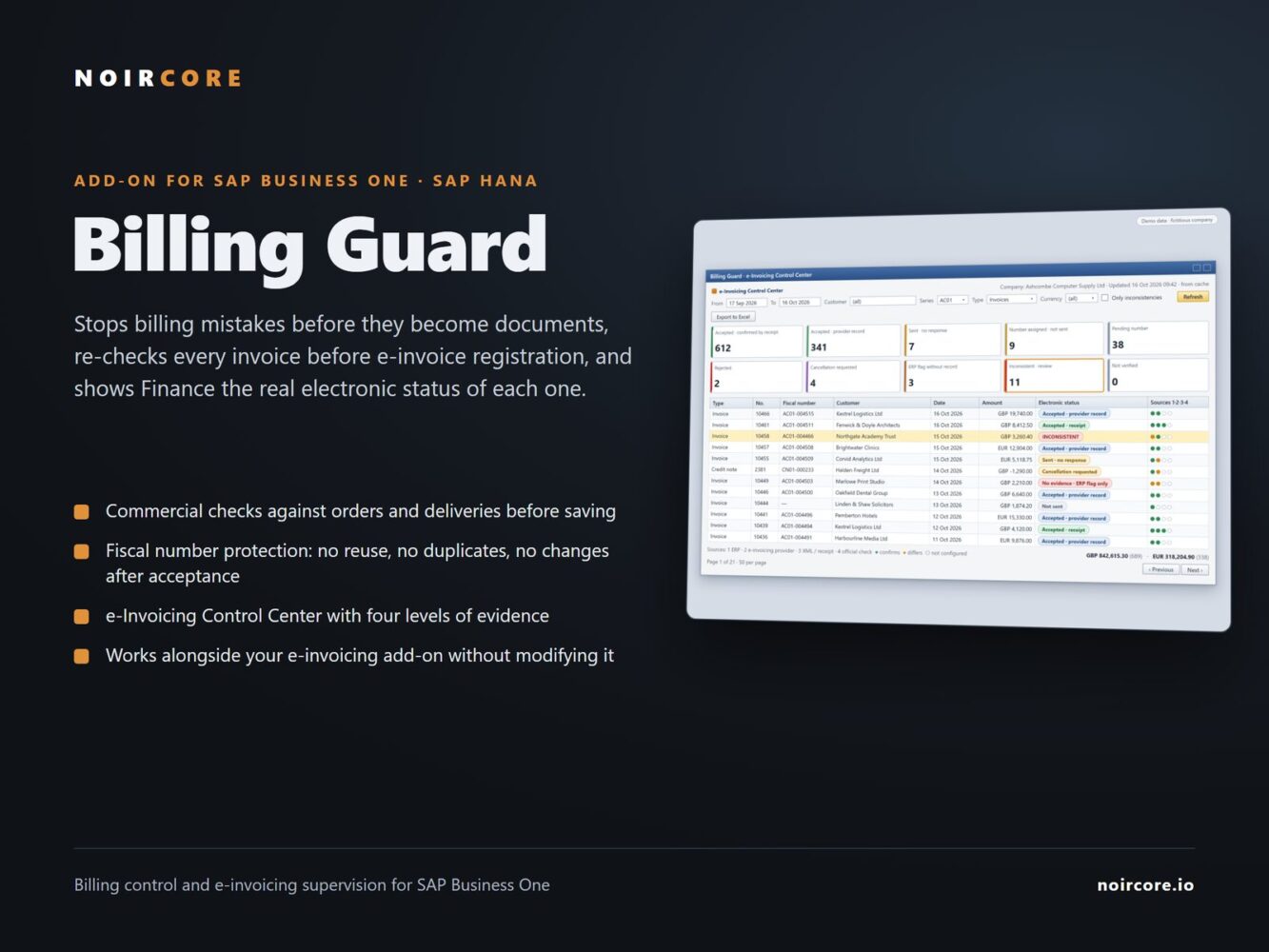
Billing Guard: Billing control and e-invoicing supervision add-on for SAP Business One

Deployment

The licence covers the extension. Deployment can be handled by Noircore or by your own IT department, and the choice does not change the licence price.

Option A

Assisted deployment by Noircore

Our team reviews the current platform, installs on a test environment, configures the rules alongside the process owner and accompanies the move to production.

Scoped and quoted separately, based on your environment.

Option B

Deployment by your IT department

The licence is delivered with the installation package, the technical prerequisites, the step-by-step installation and configuration procedure and the rollback instructions, so your own team can carry out the deployment.

Included with the licence, at no additional cost.

Screens

Billing Guard

Billing control and e-invoicing supervision for SAP Business One (SAP HANA version). Billing Guard checks every sales document while it is prepared, when it is saved, whenever it changes and right before e-invoice registration. It also shows a read-only e-invoicing portal with five trays and a Control Center inside the ERP, and emails an alert within minutes when it detects an error. Your e-invoicing provider keeps doing its job: Billing Guard never replaces or modifies it.

The problem

  • Invoices go out with more quantity than ordered, a different price, the wrong currency or the wrong exchange rate, and the error is found at month end.
  • Fiscal numbers are reused, duplicated, removed or changed after the tax authority has accepted them.
  • Finance cannot tell which invoices were really accepted without opening a separate portal, and the "accepted" flag in the ERP is not proof.

How it works

  1. Preparing: optional early warnings while the invoice is being filled in.
  2. Saving: commercial and fiscal rules decide: allow, warn, require authorization or block.
  3. Saved: the saved invoice is re-checked and receives a validation stamp.
  4. Changed: any relevant change (fiscal number, header, amounts or lines) invalidates the stamp and the approvals linked to it.
  5. Before e-invoice registration: a final check of the saved invoice with the fiscal number about to be assigned.

Features

Commercial prevention

  • Quantities, prices, items, units of measure, currency and exchange rate against the base sales order or delivery.
  • Discounts, commercial duplicates, missing base documents and unusual amounts.
  • Clear messages showing what was expected and what was found. For example: "Line 2: up to 12 open on Sales Order 2214 — detected 15."

Fiscal number protection

  • No change or removal of a fiscal number after acceptance.
  • No duplicated numbers and no numbers previously used by another document.
  • Checks the proposed number before it is assigned, including when two users get the same next number at the same time.
  • Detects out-of-sequence numbers and possible double issuance.
  • Server-side guard in the Transaction Notification for numbers written by other add-ons or integrations through the DI API. It is delivered switched off and includes a rollback script.

Credit notes and inventory

  • Credit notes cannot exceed what was invoiced.
  • Duplicate deliveries, over-delivery against the open quantity, inconsistent returns, suspicious reversals and backdated documents.

Approvals that cannot be reused

  • Single use, time limited and tied to the exact data of the document: any change invalidates them.
  • Requester and approver must be different users, and only authorized users can approve each rule.
  • Mandatory fiscal rules can never be overridden by an approval.

e-Invoicing Control Center

  • Indicators by electronic status: accepted (confirmed by receipt or by provider record), sent without response, number assigned but not sent, pending number, rejected, cancellation requested, inconsistent and not verified.
  • Filters by period, customer, tax ID, series, number, document, user, type, status and currency. Paged results and totals that never mix currencies or count a document twice.
  • Four levels of evidence: the ERP document, the e-invoicing provider's records, XML and tax authority receipts, and an official check (when access is authorized).
  • An internal flag is never presented as official acceptance. An unavailable source is shown as "not verified", never as "rejected".
  • A per-invoice window shows what each source says, with dates and alerts. It is read only: it cannot submit, cancel or change e-invoices.

e-Invoicing Portal inside the ERP

  • Five trays on the ERP menu: Issued documents, Withholding, Delivery notes, Voids and Reversals, with the same filters as your provider's portal (document type, status, series, currency, customer, tax ID or number) and export to Excel.
  • Invoices, simplified invoices, credit and debit notes and down payments, each with its status: accepted, not sent, no number, void requested, cancelled in the ERP, rejected or "review", with the alert on the row itself.
  • Voids with their ticket and reason, read from the ERP even when the provider's own void list is unavailable. A void request is never presented as confirmed without the receipt.
  • It uses the user's ERP session: no extra password to remember or store.

Email alerts

  • A scheduled check every few minutes finds fiscal numbers that differ from the accepted one, accepted numbers left on another document, possible duplicate invoices, out-of-date ERP statuses, rejections, numbers never sent and delivery notes on cancelled deliveries.
  • Each incident is reported once, with what happened and what to do, and you are told when it is no longer detected. Errors that used to surface at month end arrive within minutes.
  • Email by SMTP to the recipients you choose. The mail password is never stored in the configuration.

Optional module: electronic delivery notes

  • Delivery-notes tray for deliveries and transfers with packages, weight, unit, status and alerts, including an accepted note left on a cancelled delivery or a repeated note number.
  • Enabled by a licence signed for your company's tax ID and quoted separately. Without it, the tray shows as "not licensed" and queries nothing.

For Accounting

  • Exceptions before period close: fiscal risk, documentary differences, pending verification and historical inconsistencies. Historical items never block new work.
  • Review status, owner and notes on each exception. Export to Excel.

Requirements

  • SAP Business One, SAP HANA version. Tested on SAP Business One 9.2 PL08 with SAP HANA 1.0 SPS12; for other versions, please contact us.
  • 32-bit and 64-bit SAP Business One clients.
  • The portal uses the ERP session. For email alerts: a machine with read-only access to the ERP and an SMTP mail account.
  • Your DBA, to install the optional database components.
  • Interface language: Spanish. English localization on request.

What is included

  • Billing Guard add-on with the five-tray portal, Control Center, email alerts and desktop console.
  • Database components with installation and rollback scripts.
  • Technical and user manuals, installation guide and test plan for your test company.

Frequently asked questions

Does Billing Guard issue or cancel e-invoices?
No. Your e-invoicing provider remains responsible for that process. Billing Guard prevents, observes, compares and alerts.

Can it stop the "register e-invoice" button of my e-invoicing add-on?
By default it runs in observation mode: it re-checks the invoice and warns the user before submission. Blocking another add-on's button is enabled only after it has been validated in your test environment. The server-side guard stops a fiscal number from being reassigned when it is written to the database.

Does it change my e-invoicing add-on or its data?
No. It reads the provider's status records with a read-only user and never writes to them.

Will it slow down SAP?
Checks use parameterized, read-only queries. The Control Center caches its results and shares them between users, and the windows run without freezing the SAP client.

Do I need another password for the portal?
No. The portal uses the user's ERP session and only reads data.

Is the delivery-notes module included?
No. It is an optional module, quoted separately and enabled by a licence signed for your company's tax ID, without reinstalling the add-on.

How often do alerts arrive, and to whom?
The check is scheduled every few minutes (for example every 10) and the email goes to the recipients you define, such as Accounting and Billing. Each incident is reported once.

SAP, SAP Business One and SAP HANA are trademarks or registered trademarks of SAP SE in Germany and other countries. Screens show demo data for a fictitious company; English screens illustrate the English localization, available on request.

Noircore Partners is a commercial section of Noircore. The extensions listed here are developed by Noircore and are not official products of, certified by, or affiliated with Odoo SA or SAP SE.

Need this adapted to your deployment?

The Noircore Partners team reviews your current platform, the processes involved and the scope before anything is deployed.

Contact Partners